
The front door, built for your building.
Entrance panels and visitor screens that work with your doors. An Akuvox panel rings residents through VantageCore, and when a standard panel isn't enough, we build a custom touchscreen that runs exactly what your building needs.
Pick the entrance that fits the building.
All three run with VantageCore, the app that runs your ICT Protege doors, so the intercom, visitor passes, fobs and door records live in one place.
A video entrance panel joined to VantageCore. Visitors dial a unit, the resident's phone rings, and Open goes through your access control.
- The directory follows your VantageCore records
- A call rings the resident's app with video, or the front desk
- Visitor QR passes read at the panel
Good for: apartment lobbies and office entrances with ICT Protege WX doors.
How it worksA touchscreen we build and program ourselves, running the check-in, directory or concierge flow your building actually needs, paired to VantageCore.
- Your logo, colours and welcome on screen
- Visitor pass check-in, printed badges, sign-out
- Any size, wall mount or lobby stand
Good for: lobbies, clinics and offices that want more than a dial pad at the door.
What we can buildA camera doorbell watched by VantageCore. A press tells the people you choose that someone is at the door; they tap to see the camera and open.
- Rings the staff you pick, in order, until someone answers
- Open unlocks that door through your access control
- Every press and open in the same record as your fobs
Good for: a back door, a small office, a clinic, a delivery entrance.
A screen that does exactly what your building needs.
Most entrance panels do what their maker decided. Ours do what you decide. We build Linux touchscreen panels in-house, in a wall mount or a lobby stand, and write the software for the building: how visitors check in, who they can reach, what they see while they wait. It pairs to the VantageCore appliance in your building, so a pass checked at the screen opens the door through your access control and lands in the same record as every fob.
These are already in the field. We have built, installed and supported custom panels for customers, and we'll build one for yours.
Looks like the building
Your name, logo, colours and welcome message on the screen. Visitors see your building, not a product.
Visitor passes, checked at the door
A visitor holds up the pass a resident or the front desk sent them. The screen checks it with VantageCore and opens the entrance once.
Badges and sign-out
Print a visitor badge at sign-in, scan it to sign out. The front desk sees who is on site right now.
Directory and concierge flows
Find a resident or a company, call reception, follow your own check-in steps. We build the flow around how your lobby already works.
Knows about a lockdown
During an evacuation or lockdown set from VantageCore, the screen stops signing visitors in and shows an emergency notice instead.
Paired, not just plugged in
The panel shows a six-digit code, a manager types it into VantageCore and picks the door it stands at. Its keys never leave the panel.
Each screen is scoped with you and listed on your quote. Hardware, mounting and door work are quoted separately; the panel's software, pairing and support come from the same team that installs it.
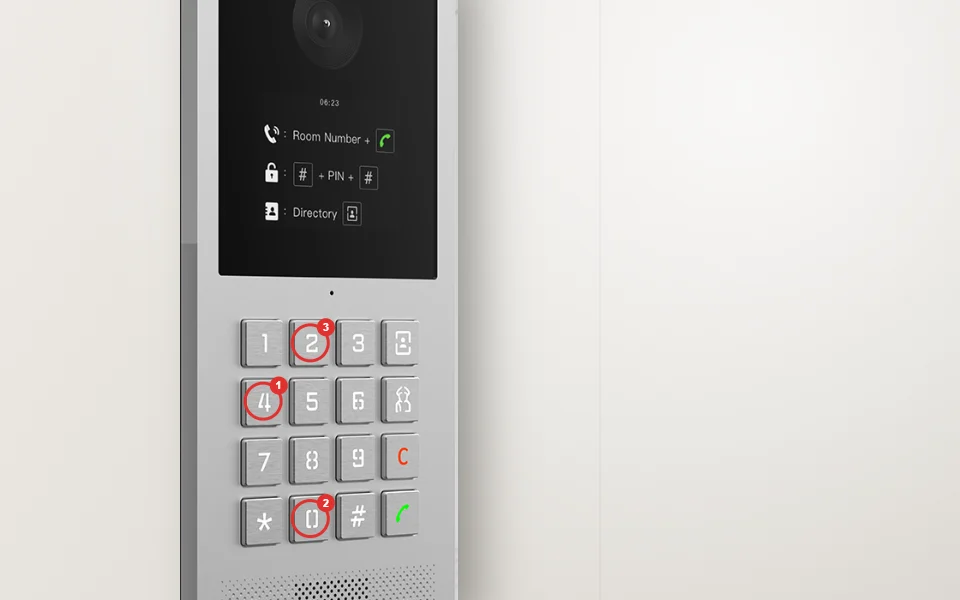
They dial 402. The resident's phone rings.
An Akuvox entrance panel joins the same system as your ICT Protege WX doors. No second directory to keep, no second app.
- The panel's directory follows your VantageCore records, by unit number by default, so names stay private
- A call rings the resident's VantageCore app with the panel's video and two-way talk, or rings the front desk in a browser. Android today, iPhone coming soon
- Open goes through your access control, so it lands in the same record as every fob
- Visitor passes from a resident or the front desk are read as a QR at the panel
Runs in your building, not in a vendor's cloud
The Akuvox panel and any custom screen connect to the VantageCore appliance on your own network, not to Akuvox's servers. We don't set up an Akuvox cloud account, so your resident list, call records and door releases stay on your system. Calls to phones on the building's Wi-Fi keep working with the internet down. Ringing a phone away from the building uses your internet connection.
From site visit to first visitor.
We look at the door
The entrance, the existing wiring, the door hardware, and how visitors should reach people inside.
We build and install
Panel or screen, cabling, door release and the directory, built from your tenant list and your check-in steps.
We stay on call
Questions, changes and service calls go to one team, the same people who built and installed it.
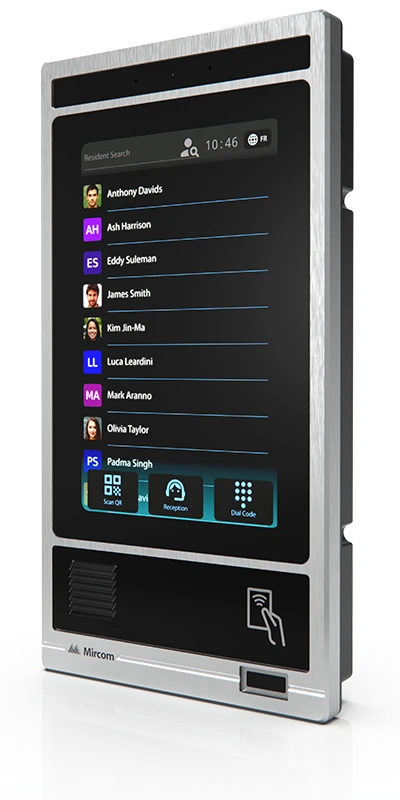
A stand-alone touch panel with its own directory, phone-line or MiVoIP calling and the MiEntry app. It is a closed system and can't connect to VantageCore, so we suggest it when a building wants a panel on its own or is replacing an older Mircom system.
Let's look at your front door.
Tell us about the building and the entrance. We'll show you VantageCore and a custom screen in a demo, suggest what fits, and quote the install.